
NtFlankControl.DrawLines Method
Taking a look onto a NtFlankControl, you will find the rows in the NtFlankControl are separated by a thin black line:
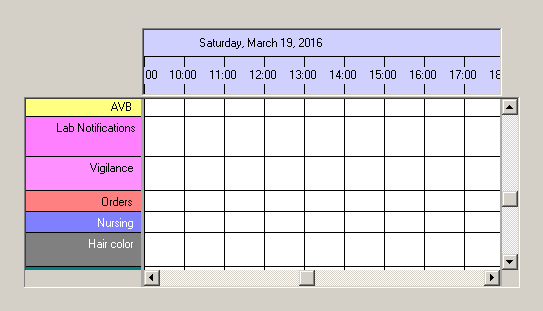
NtFlankControl performs the drawing of these lines in this method
Overload List:
| Modifier / Return Value | Name and Parameters | Description |
|---|---|---|
|
|
|
Draws horizontal and vertical lines to separate the rows and columns within the NtFlankControl (and its derivates). |
Return value:
Parameters:
This is the Graphics object provided by the system in the OnPaint method. Overriding methods use this parameter in order to draw
the lines in their own way.
The Rectangle structure describing the clip rect for the current paint process.
Typically any drawing process has to be corrected by the current scroll position of the control.
See the
Remarks:
You can implement your own line drawing by overriding this virtual method. Use the clip rect to reduce the drawing effort as far as possible. You will need the NtTimeChartControl.GetRowHeight() and NtTimeChartControl.GetRowY() members to calculate the appropriate coordinates.
See also:
NtTimeChartControl.GetRowHeight()
NtTimeChartControl.GetRowY()