
NtFlankControl
The Flank Controls are located to the left or right of the main chart and represent the legends of each of the rows. They are of type
A NtTimeChartControl can have more than one
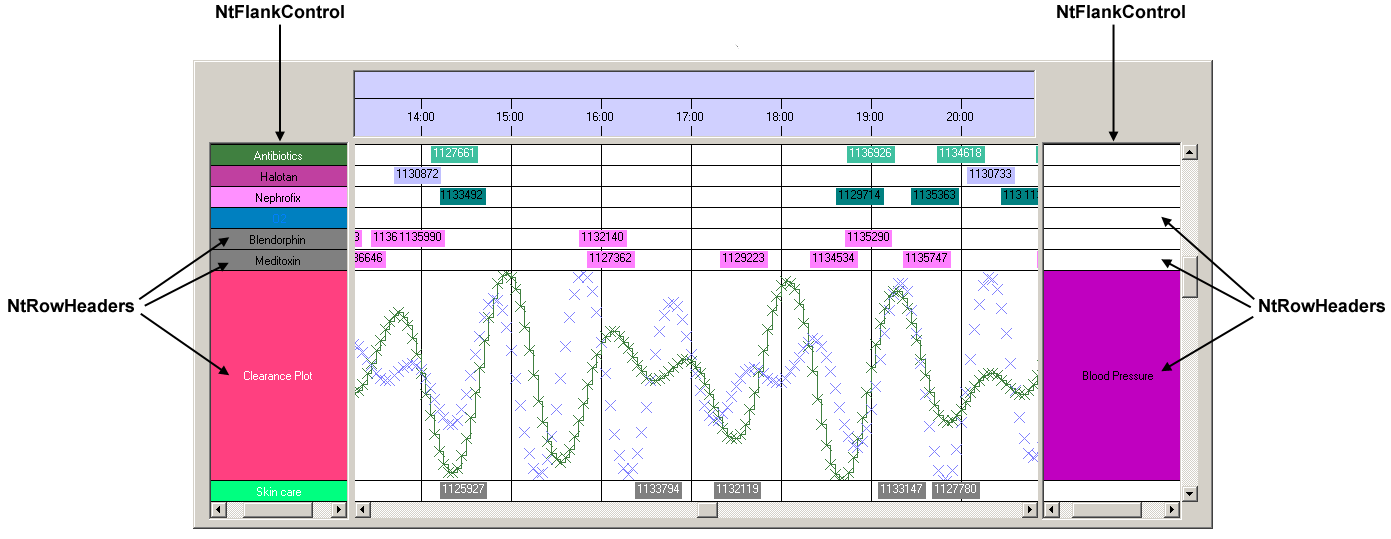
In most cases there is no need to change the behaviour of the
Class Hierarchy:

Constructors:
| Modifier | Name and Parameters | Description |
|---|---|---|
|
public |
The only constructor. It initializes certain members. |
Methods and Properties:
| Modifier / Return Value | Name and Parameters | Description |
|---|---|---|
| protected override void | DrawLines ( Graphics g, Rectangle clipRect ) | This method draws the horizontal lines that separate the NtRowHeaders from each other. Called by OnPaint(). Override this if you want to change the drawing or want to do no drawing of lines at all. |
| public void | Init ( NtTimeChartControl ntTimeChartControl, NtHScrollBar ntHScrollBar, int sheetWidth ) |
Attaches this |
| public void | InvalidateRowHeader ( int row ) |
Invalidates a certain Row Header. |
| protected override void | OnPaint ( PaintEventArgs pe ) |
The paint method inherited from |
| protected override void |
|
The method for painting the background. Inherited from |
| public int | SheetWidth |
Read only property. Returns the sheet width of the |
| public bool | ShowCategoryTexts |
Property to enable / disable the display of the category header texts. When set to |
Members:
| Type | Name | Description |
|---|---|---|
|
|
catTextIntentionPerCatLevel | Defining categories, sub-categories, sub-sub-categories and so on, this makes up different levels of categories like different levels of a tree. To give users a visual feedback on this category levels, the font, font size, row height and even text intention can vary between the different category levels. This finally makes up a fine optical differentiation between the different category levels. This intention is given in pixels. The default is 8. |
Events:
| Event Name | Event Arguments | Description |
|---|---|---|
| beginRowDragging | NtRowDraggingEventArgs | This Event is fired when vertical dragging of a row or a full category is about to occur. You can catch and cancel this event to prevent the dragging. This is useful if you want to allow dragging for certain rows, only or want to completely avoid row and category dragging. When catching the event you will receive a NtRowDraggingEventArgs object that contains all necessary information about which row or rows are being dragged. |
| continueRowDragging | NtRowDraggingEventArgs | This Event is fired when vertical dragging of a row or a full category is being continued. You can catch and cancel this event to prevent further vertical movement of the row or category. |
| endRowDragging | NtRowDraggingEventArgs | This Event is fired when vertical dragging of a row or a full category is about to be completed. You can catch and cancel this event to prohibit the dragging. In this case the row or category flips back to its original position. This is useful if you decide that the final dragging position is illegal. When catching the event you will receive a NtRowDraggingEventArgs object that contains all necessary information about which row or rows are being dragged (and where). |