NtRowHeader
A NtRowHeader makes up the legend for a Time Chart row. A Row Header is placed within a NtFlankControl. This
NtFlankControl constantly aligns its vertical scroll position to that of the NtTimeChartControl and thereby
ensures that all NtRowHeaders are always placed in the correct vertical position according to scrolling of the Time Chart.
Within one NtFlankControl there can only be one NtRowHeader per row. But there can be more than one
NtFlankControl per NtTimeChartControl in order to have more than one legend for the Time Chart as a whole.
This makes sense in cases where you have rows in your Time Chart that combine more than one data type in one row.
Below please see an example of a NtTimeChartControl with one legend to the left and one to the right:
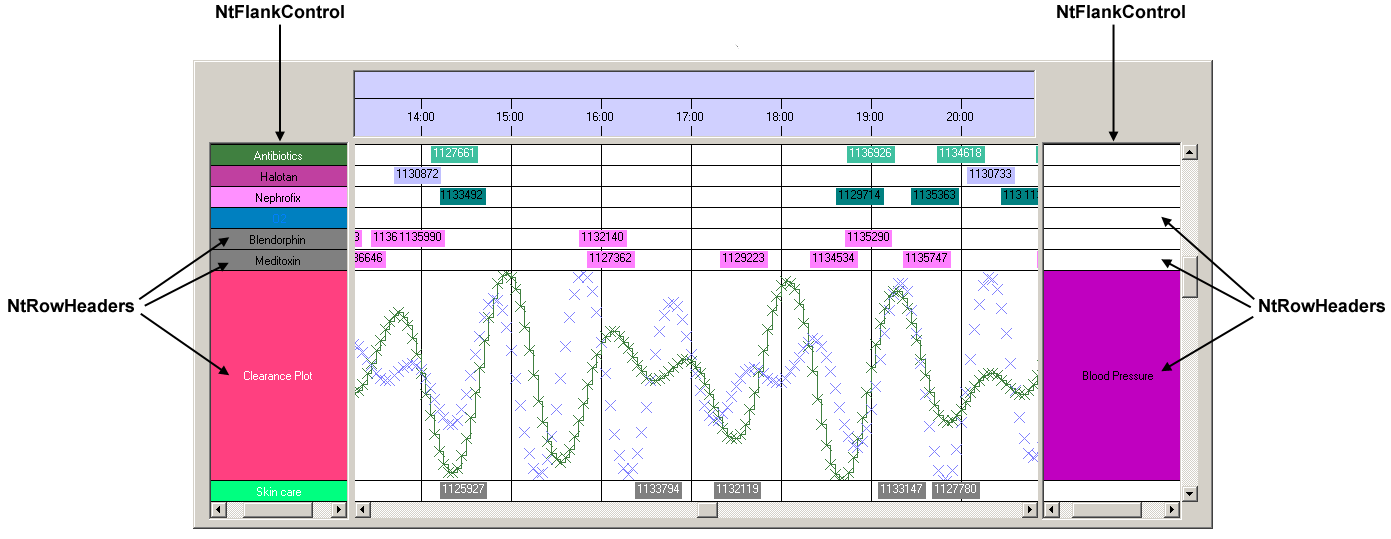
See the tutorial Row Headers and Flank Controls to find out how to set up NtRowHeaders.
System.Object
 NtRowHeader
| Modifier |
Name and Parameters |
Description |
|
public
|
NtRowHeader ( )
|
The only constructor. It does not take any paramters.
|
| Modifier / Return Value |
Name and Parameters |
Description |
|
public virtual void
|
InitRowHeaderBitmap ( Bitmap bitmap, Brush bkBrush )
|
Initializes the NtRowHeader by a bitmap and a background brush. On drawing, the background is filled first, then the bitmap will be drawn on top. The bitmap can be positioned
within the NtRowHeader using its member bitmapPos.
|
|
public virtual void
|
InitRowHeaderText ( String text, Font font, Brush bkBrush, Brush textBrush, Graphics g )
|
Initializes this NtRowHeader by a text. This text will be drawn onto the background (and on the bitmap if any) using the
font and textBrush.
|
| Type |
Name |
Description |
|
public Brush
|
bkBrush
|
The System.Drawing.Brush that is used to draw the background of this specific Row Header.
|
|
public Brush
|
textBrush
|
The System.Drawing.Brush that is used to draw the text (eventually overlapping the bitmap).
This member is assigned either directly (as it is public) or via a call to InitRowHeaderText().
|
|
public string
|
text
|
The text to draw either onto the NtRowHeader itself or onto its bitmap.
|
|
public Font
|
font
|
The Font used to draw the text either onto the NtRowHeader itself or onto the bitmap.
|
|
public SizeF
|
textSize
|
When initializing a NtRowHeader by calling its InitRowHeaderText() method, this method will calculate the bounding
rectangle of the text you provide by using the Graphics g parameter. This textSize is later used to properly position the text when drawing.
You should not change this member manually unless you change the text (without calling InitRowHeaderText()).
|
|
public Point
|
textPos
|
Set this member to define the Row Header's text position relative to the top left corner of the Row Header.
|
|
public Bitmap
|
bitmap
|
If you want to create a legend that is a little more sophisticated than a filled rectangle with a plain text, you can initialize the bitmap member by calling
InitRowHeaderBitmap().
In general you will call InitRowHeaderBitmap() only once per NtRowHeader during initialization and
then the bitmap will be reused during every paint process. You can change the bitmap any time. Please make sure to call Invalidate() on the
comprising NtFlankControl in order to initiate a redraw.
|
|
public Point
|
bitmapPos
|
Position of the bitmap relative to the top left corner of the Row Header. Useful, to properly position your bitmap in case it is not filling the
NtRowHeader entirely (e.g. an icon). The default value for the position is (0,0) which is the top left corner of the Row Header.
|
