
NtCustomObjectPaint.NtCalculateLeftAndRightEdgesTicks Method
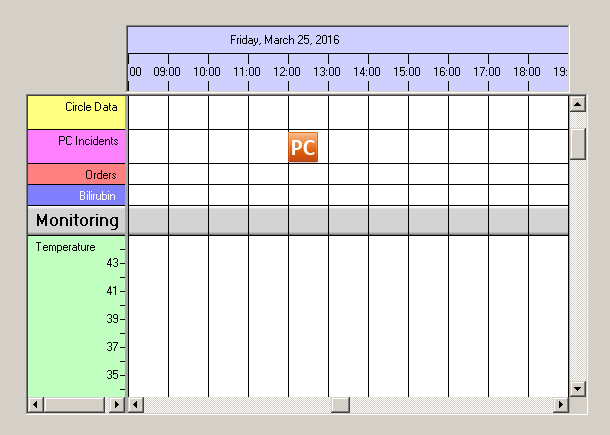
Display Objects have a certain width. Suppose you create a hotline software and want to symbolize customer calls by an icon. The icon's left edge indicates the time of the call while the right edge is placed more to the right. Please see the sceenshot below: A customer has called for PC support exactly at 12:00. So the left edge of the icon is located at 12:00. Meanwhile the right edge of the icon is located at another time which depends not only on the width of the icon but also on the current time scale factor of the NtTimeChartControl. In this example this is roundabout 12:45.
The second screenshot (below) shows the same data, but the time scaling factor (
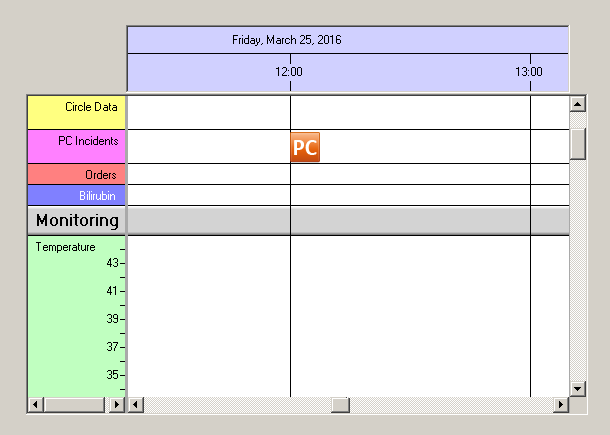
The NtTimeChartControl needs to know about the time stamps of the left and right edges at any time and thereby calls this member function. The implementation
is fairly easy. In the example above (with an icon width of 30 pixels) it simply looks like this:
Overload List:
| Modifier / Return Value | Name and Parameters | Description |
|---|---|---|
| NtDisplayObject |
|
Implement this interface method to create a display object for the data object given. |
Return value:
Parameters:
The NtTimeChartControl that does the call. Normally not used if you have only one NtTimeChartControl
in your Form or application. But if you have more than one NtTimeChartControl and implement this interface only onece, this parameter might be helpful.
The data object to do the calculation for.
The
The time scaling factor the NtTimeChartControl currently works with. It describes the time difference of two neighboring pixels in ticks. One tick
is 100 nano seconds.
The left edge of the NtDisplayObject in ticks. It is the first output parameter of this method.
The right edge of the NtDisplayObject in ticks. It is the second output parameter of this method.
Remarks:
None.