NtDisplayObject
Display Objects are the visual representation of the data objects that are stored in the NtTimeChartControl. While the
NtTimeChartControl may contain millions of data objects (type NtDataObject) only a few of them are visible at a time.
For each object that is visible (or at least is placed on the current sheet) the NtTimeChartControl creates a NtDisplayObject
which performs the drawing of the object. So in general there are far less NtDisplayObjects than NtDataObjects stored in the
NtTimeChartControl.
It is important to understand that the time stamp of the data object (member dt) does answer the question if an object is currently visible: If an object's dt is earlier
than the left of the visible area and the dtEnd is later than the right end of the visible area then the object's paint rect fully crosses the visible range although none of its dates is located
within the visible range. The NtTimeChartControl manages this by its internal algorithms and always ensures that all data that touches the visible area is actually
displayed.
Below find an image of a NtTimeChartControl that holds several display objects. Every icon, bitmap or crossed sample of the plot is a
NtDisplayObject.
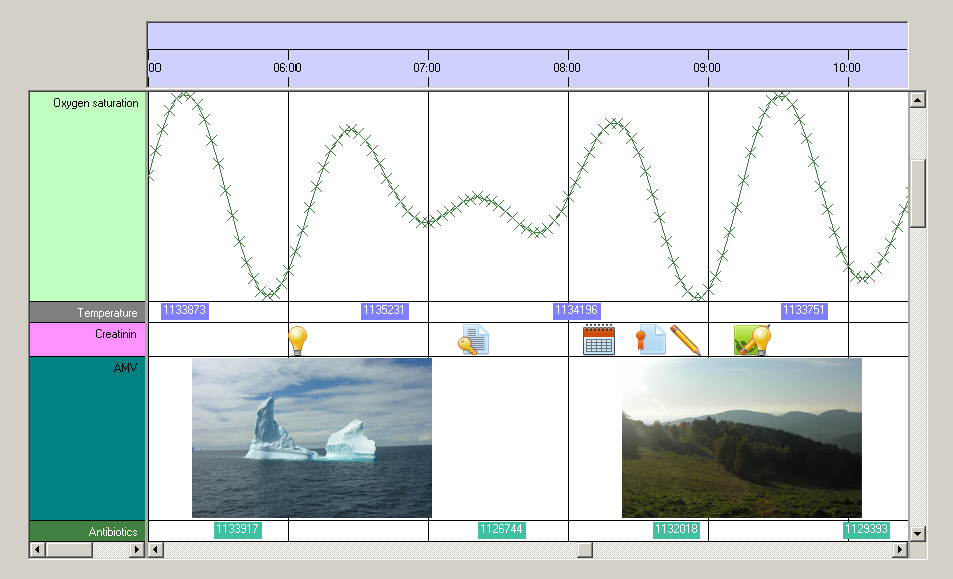
Please note: Drawing of objects is done in order of their dt member. So if display objects are so close to each other that they overlap, the newest is always visible as it has the highest
time stamp and is drawn on top of the older ones.
NtDisplayObject is of interest for developers in two cases:
- If you want to react on events that involve visible objects, like mouse click events that occur on objects
- If you want to develop custom drawn objects. Custom drawing means to derive own types from this class. Please see the tutorial Custom Object Drawing on how to do this.
The NtDisplayObject class does not have any public constructor. It can only be created by the NtTimeChartControl.
System.Object
 NtDisplayObject
| Modifier / Return Value |
Name and Parameters |
Description |
|
public int
|
CategoryRow
|
The is the row that hides this NtDisplayObject in case of a superior category being closed: Explanation: In case that this display object is in a row which is member of a
category then this category can be closed. Then the NtDisplayObject is hidden. And instead of the object a so called category line (a thin vertical line in place of the object) is
being drawn directly onto the category row. This readonly property returns the row index of the closing category if there is one. If not, it returns -1.
|
|
public int
|
CurrentRow
|
The zero base index of the row the NtDisplayObject is currently in. Currently means that this might change any time due to users dragging rows and thereby change their order or the
application setting a new NtPerspective. This property is readonly.
|
|
public NtDataObject
|
DataObject
|
Readonly property that allows you to access the embedded NtDataObject. This is helpful because several events like mouse clicking on Display Objects will
hand you over their NtDisplayObjectEventArgs that reference a NtDisplayObject. Then you typically need to get access to its
embedded NtDataObject to react properly.
|
|
public NtDisplayDef
|
DisplayDef
|
The NtDisplayDef that is set for this NtDisplayObject because it is set for the data type this
NtDisplayObject represents.
|
|
public int
|
DisplayMethod
|
This is the display method for this NtDisplayObject. Please see NtDisplayDef for details. In case of custom drawn objects this
property is greater than 100.
|
|
public Rectangle
|
PaintRect
|
This is the rectangle that comprises this NtDisplayObject. It is given in row coordinates. This means that X=0 is the left end of the current sheet, Y=0 means top of the row
it resides in. It is not an error if the paint rectangle exeeds the sheet horizontally or the row vertically. Painting will be clipped accordingly.
When you do custom drawing, the NtTimeChartControl's framework will initialize this property correctly before calling your implementation of the
NtCustomObjectPaint interface so you do not need to bother about coordinate transformation but can simply draw within this rectangle.
|
|
public bool
|
Selected
|
This readonly property tells if the data object that is represented by this NtDisplayObject is currently selected. You can use this if you implement custom object drawing, because
you might want to show your self drawn object differently if it is selected (like selected text in a typical text editor). Please see the tutorial
Custom Object Drawing for an example.
|
| Type |
Name |
Description |
|
public Bitmap
|
bitmap
|
The bitmap that is used to draw the object if it is not null.
|
