
NtDisplayDef.dataTypeId Member
Every data object stored in the NtTimeChartControl is of a certain type. This type is determined by the NtDataObject's
member
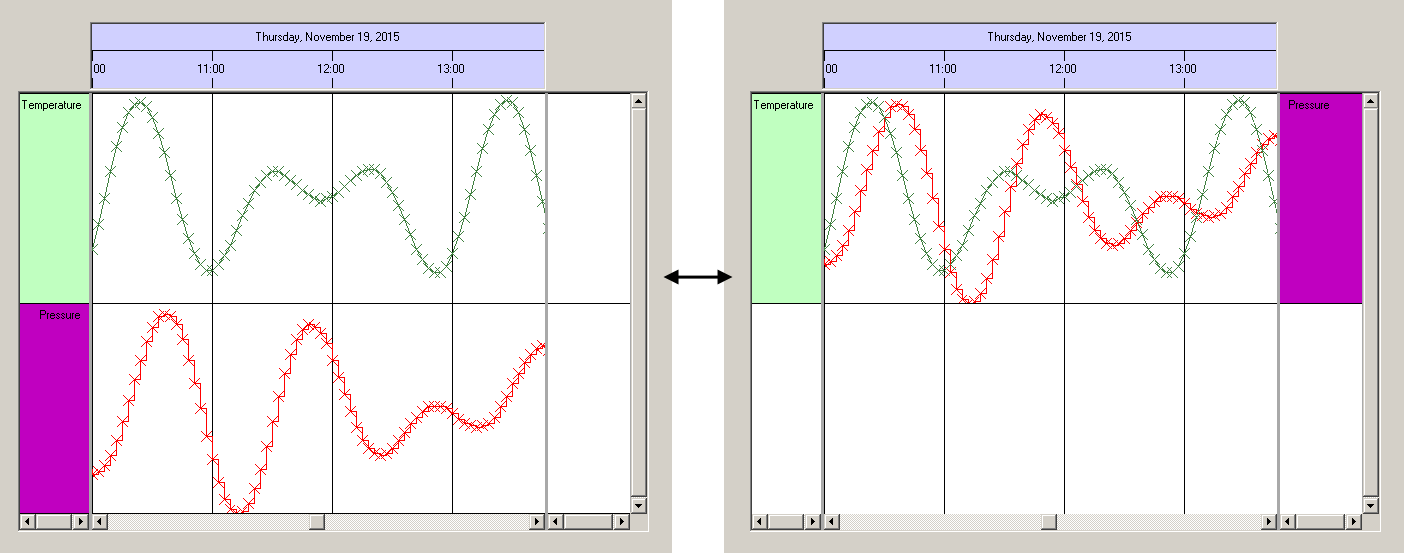
All data of the same type is displayed in the same row of the NtTimeChartControl. Still there can be more than one data type in the same row.
Example:
Suppose you want to show only two types of data in your NtTimeChartControl: 'Temperature' and 'Pressure'. Then from database your application might load many
temperature values and many pressure values. For each of the values you will create an instance of NtDataObject. Your application will then set the
To define how data is being displayed your application will create two NtDisplayDef objects and put them to the
NtTimeChartControl by calling SetDisplayDef().
Now the NtTimeChartControl knows how to draw temperature and pressue. But it still does not know where (in which row) it has to draw them.
This is a question of row assignment. For this, your application sets up a NtPerspective. If your application wants temperature and pressure to show up in two
different rows, it will add two different NtRowPerspective (adding 100 into one and 200 into the other) and put them into the
NtPerspective.
If instead temperature and pressure shall show up together in only one row, the application will just create one NtRowPerspective (adding both 100 and 200) and put
it into the NtPerspective.
But even if both data types are shown in the same row, they keep their own way of drawing in terms of colors, fonts, style (curve, text, image).
Summary:
The way how data is drawn is being defined by NtDisplayDef objects (one per data type) while the row assignment is done by the
NtRowPerspectives (one per row) stored in the NtPerspective.
Please see the image below for this example:
The important conclusion from this article is that all data of the same type shall have the same
Type:
Remarks:
This value should be set upon initinalization and not be changed any more. Values have to be from 1 up to 9999.
See also: