
NtDisplayDef.tooltipType Member
The tooltip type. Possible values are
0: no tooltip.
1: simple tooltip (plain text with no formatting except new lines and tabs)
2: HTML based tooltip.
Please see the screenshot overlay below: A NtTimeChartControl showing pressure and temperature curves. On temperature you can see a simple tooltip while pressure is
configured to have html tooltip. The HTML tooltip is made of a headline, an image and a text. The background color and the border are set up in the HTML of the tooltip.
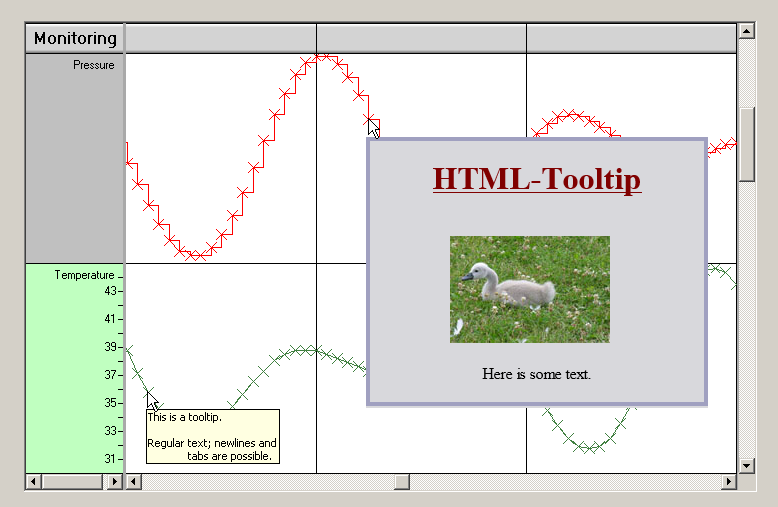
As you can see, HTML tooltips can be pretty big and well designed. You pass the HTML stream as a string to the NtTimeChartControl on demand (whenever the
NtTimeChartControl calls the interface method NtApplication.NtGetTooltipText passing the
object the tooltip is for). On this way your application can simply assemble html tooltips specifically for the data object the mouse is over.
So the HTML tooltips are useful to provide a strong user experience and a detailed information on the very data object.
Still HTML tooltips consume more resources like memory and CPU power.
Please see the tutorial Tooltips on how to create and configure tooltips that are specific for your data objects.
Type:
Remarks:
Possible values are 0, 1, and 2. 2 is the default. For all other values the behaviour is undefined.