NtDisplayObjectCross
Derived from NtDisplayObject.
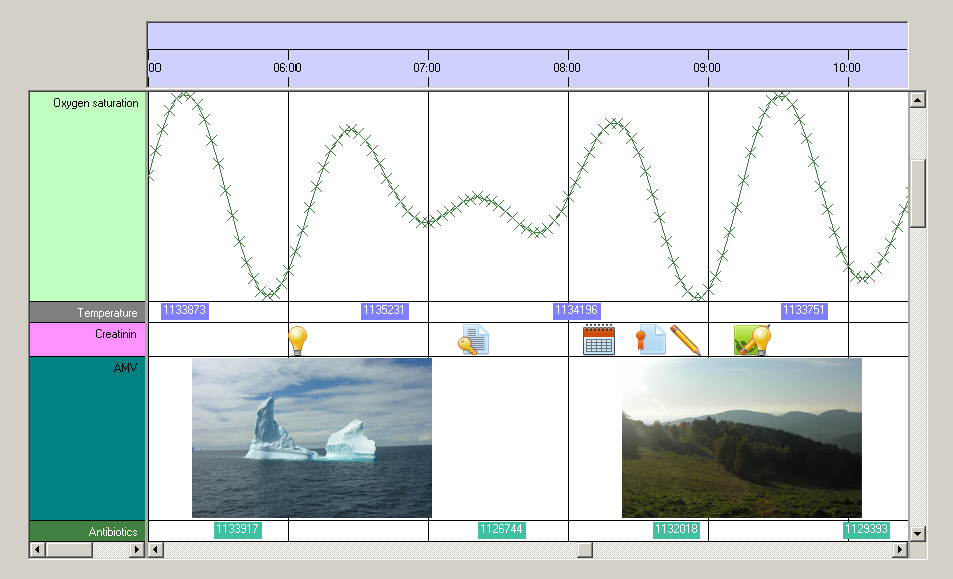
The NtTimeChartControl creates NtDisplayObjectCross objects for data objects that are declared (by the according
NtDisplayDef) to be drawn as crossmarks. In the image below you can find such NtDisplayObjectCross objects in the first row
('Oxygen saturation'). Crossmark objects are not located on a horizontal line but their ordinate (Y-coordinate) within the row is determined by their numerical value. The numerical value
comes from parsing the text member as a floating point number. The scaling of the vertical displacement is determined by the NtDisplayDef
for the data type. For example if NtDisplayDef.scaleMin is zero and NtDisplayDef.scaleMax is 100 then a NtDataObject
having the text '50' will be located in the middle of the row.
The NtDisplayObjectCross class does not have any public constructor. It can only be created by the NtTimeChartControl.
System.Object
 NtDisplayObject
NtDisplayObjectCross
| Modifier / Return Value |
Name and Parameters |
Description |
|
public NtDataObject
|
DataObject
|
Readonly property that allows you to access the embedded NtDataObject. This is helpful because several events like mouse clicking on Display Objects will
hand you over their NtDisplayObjectEventArgs that reference a NtDisplayObjectCross. Then you typically need to get access to its
embedded NtDataObject to react properly.
Inherited from NtDisplayObject.
|
|
public int
|
CurrentRow
|
The zero base index of the row the NtDisplayObjectCross is currently in. Currently means that this might change any time due to users dragging rows and thereby change their order or the
application setting a new NtPerspective. This property is readonly.
Inherited from NtDisplayObject.
|
|
public int
|
CategoryRow
|
The is the row that hides this NtDisplayObjectCross in case of a superior category being closed: Explanation: In case that this display object is in a row which is member of a
category then this category can be closed. Then the NtDisplayObjectCross is hidden. And instead of the object a so called category line (a thin vertical line in place of the object) is
being drawn directly onto the category row. This readonly property returns the row index of the closing category if there is one. If not, it returns -1.
Inherited from NtDisplayObject.
|
|
public Rectangle
|
PaintRect
|
This is the rectangle that comprises this NtDisplayObjectCross. It is given in row coordinates. This means that X=0 is the left end of the current sheet, Y=0 means top of the row
it resides in. It is not an error if the paint rectangle exeeds the sheet horizontally or the row vertically. Painting will be clipped accordingly.
When you do custom drawing, the NtTimeChartControl's framework will initialize this property correctly before calling your implementation of the
NtCustomObjectPaint interface so you do not need to bother about coordinate transformation but can simply draw within this rectangle.
Inherited from NtDisplayObject.
|
|
public int
|
DisplayMethod
|
This is the display method for this NtDisplayObjectCross. Please see NtDisplayDef for details. In case of custom drawn objects this
property is greater than 100.
Inherited from NtDisplayObject.
|
|
public NtDisplayDef
|
DisplayDef
|
The NtDisplayDef that is set for this NtDisplayObjectCross because it is set for the data type this
NtDisplayObjectCross represents.
Inherited from NtDisplayObject.
|
|
public double
|
DVal
|
This is the numeric value of the object. It is created by parsing the embedded NtDataObject's text as a floating point number.
|
| Type |
Name |
Description |
|
public Bitmap
|
bitmap
|
The bitmap of this NtDisplayObjectCross. It is null because the cross is drawn without using the bitmap.
Inherited from NtDisplayObject.
|
