
NtHeaderControl
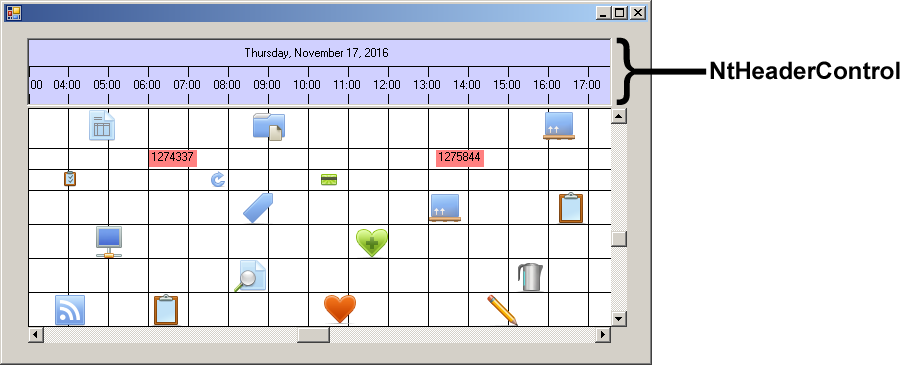
The Header Control is representing the time axis of the Time Chart. The object of type
Class Hierarchy:

Constructors:
| Modifier | Name and Parameters | Description |
|---|---|---|
|
public |
The only constructor. It initializes certain members. |
Methods and Properties:
| Modifier / Return Value | Name and Parameters | Description |
|---|---|---|
| public void | Init ( NtTimeChartControl ntTimeChartControl, Font colFont, Font superColFont, bool topDown ) |
Attaches this |
| protected override void | OnPaint ( PaintEventArgs pe ) |
The paint method inherited from |
| protected override void | OnPaintBackground ( PaintEventArgs pe ) |
The method for painting the background. Inherited from |
| protected virtual void | DrawLines ( Graphics g, Rectangle clipRect ) | This method draws the lines that separate the two rows of the Header Control as well as the columns. Override this if you want to change the drawing or want to do no drawing of lines in the Header Control at all. |
| public void | SetTimeUnitNames ( String[] names ) | The Header Control is able to pop up a small window containing a dropdown that allows to change the TimeDisplayMode. Users select the mode they want to use. Per default the selectable entries are "5 Minutes", "15 Minutes", "Hours", "6 Hours", "Days", and "Months". These six strings can be changed by calling this method providing an array of six strings. By this you can change the naming of the entries, just in case you want to have other strings or need to translate your application into another language. |
Members:
| Type | Name | Description |
|---|---|---|
| public bool | calendarModePopupEnabled | The Header Control is able to pop up a small window containing a dropdown and a calendar. These controls allow users to adjúst the time display mode (days, hours etc.) and jump to any date quickly. |