
NtPerspective
The NtTimeChartControl is made to display data of various data types. The way how data is being shown is determined by three layers:
1. The Application: The application determines the basic layout: How many legends (NtFlankControls) does my Time Chart have? Will category header texts
be shown and how? These things are basic settings that are defined at design time and will hardly change at runtime.
2. The Display Definitions: One NtDisplayDef has to exist for each data type. It determines if data is being drawn as courve, icon, text, custom drawn etc. It also
determines the colors (background and foreground) for the Row Header and the data itself and several more things that are specific to one data type. These settings are loaded dynamically when preparing the
data set for display. A good point in time is the Form initialization phase (
3. The Perspective: The Perspective is the current view of the data: It defines which data types are show in which row (and if a certain data type is currently shown at all), which legend (Row Header)
is currently associated with which data type and what the current Category setup is (are there any categories at all, which of them are open, which are closed?). The Perspective can be changed at any time
while showing the Time Chart: If you want to show only some of the data, your application can switch to a Perspective that arrange only this. Or if the user prefers another order of the rows, he can drag rows
vertically and thereby change the current Perspective. And users can open and close categories at any time.
So the Perspective changes frequently and can can be read from the
NtTimeChartControl (method GetNtPerspective() to save the current status of the view or it can be
replaced to change the view.
Please take a look onto the image below: It describes how the same data is being shown by two different
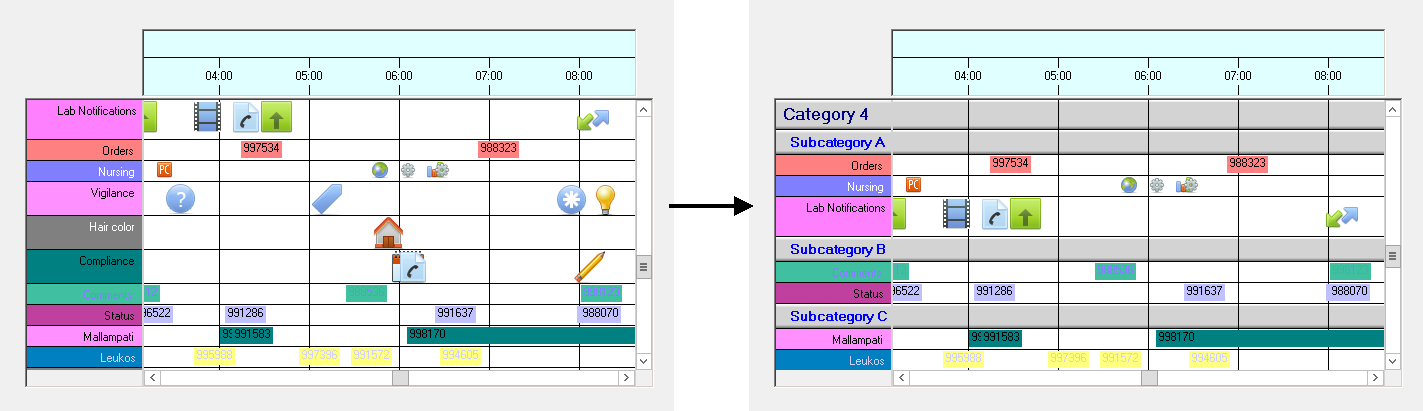
In other words:
- The NtTimeChartControl holds one perspecitve at a time. The application can set a new Perspective at any time and thereby change the display instantly.
- For each row the perspective holds one NtRowPerspective that defines that very row.
- Each NtRowPerspective defines which data types are shown in that row. Data types must be unique among the NtRowPerspectives.
- Each NtRowPerspective defines if a certain row is a category row (and its level) or a regular data row.
Please see the illustration below about the nesting of Perspecitves, NtRowPerspectives and data types:
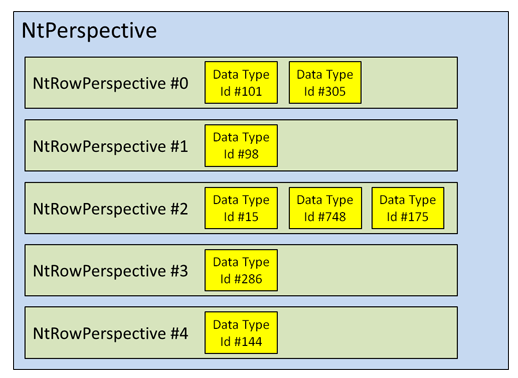
Please note that within the Time Chart row indices start with 0 for the topmost row.
Class Hierarchy:

Methods and Properties:
| Modifier / Return Value | Name and Parameters | Description |
|---|---|---|
| public NtPerspective |
|
This creates a clone of this |
| public int |
|
This helper function allows you to find out which row currently holds the data of type |
| public int |
|
This helper function allows you to find out the parent category of the This is needed for advanced programming of the NtTimeChartControl, only. Normally you do not use it. |
| public int |
|
This helper function allows you to find out the closing category of the This is needed for advanced programming of the NtTimeChartControl, only. Normally you do not use it. |
| public int |
|
This helper function allows you to find out the topmost closing category of the This is needed for advanced programming of the NtTimeChartControl, only. Normally you do not use it. |
| public void |
|
Normalizing a |
Members:
| Type | Name | Description |
|---|---|---|
| public int |
|
After calling This is needed for advanced programming of the NtTimeChartControl, only. Normally you do not use it. |
| public List<NtRowPerspective> |
|
For each row it wants to define the When creating a |
See also: