
NtTimeChartControl.FillBackground Property
The NtTimeChartControl draws all visible data items on its so called sheet. You can move around the sheet by scrolling or dragging.
Normally the sheet is plain white. Meanwhile, the row headers (on the left of the Time Chart) may very well have different background colors to give users a visual orientation about the meaning of the data.
For good usability the white sheet is the best choice in most cases. But for some applications it might be nice to have the different rows also colored the same way. In other words: On the sheet, the different rows
should be filled with the same background color as the row header. Please see the following image for the concept:
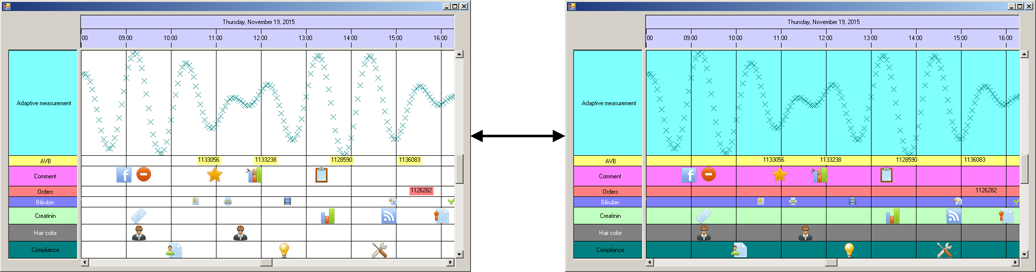
You can switch between both variants by changing the bool value of this property at any time.
Overload List:
| Modifier / Return Value | Name and Parameters | Description |
|---|---|---|
|
|
|
Switch background filling on and off. |
Return value:
The current state of filling the background.
Remarks:
The background colors of each row are taken from the row headers of the first NtFlankControl. Remember: A NtTimeChartControl can have more than one
NtFlankControls being associated to it: For example you might have one row header to the left of the Time Chart and one to the right. This makes sense if you
have rows in your Time Chart that each display tow different data types at a time. In these cases you might want to have a legend for each of the data types. But of course the Time Chart itself can only
have one background color per row. So this color is determined by the first NtFlankControl linked to the
NtTimeChartControl.
You can switch between both states of this property at any time. The display will adjust instantly.
See also: