
NtTimeChartControl.SetScrollBars Method
The NtTimeChartControl can be scrolled horizontally and vertically. Therefore one horizontal and one vertical scroll bar can be assigned to the
NtTimeChartControl.
It is important to understand why the internal scroll bars inherited from
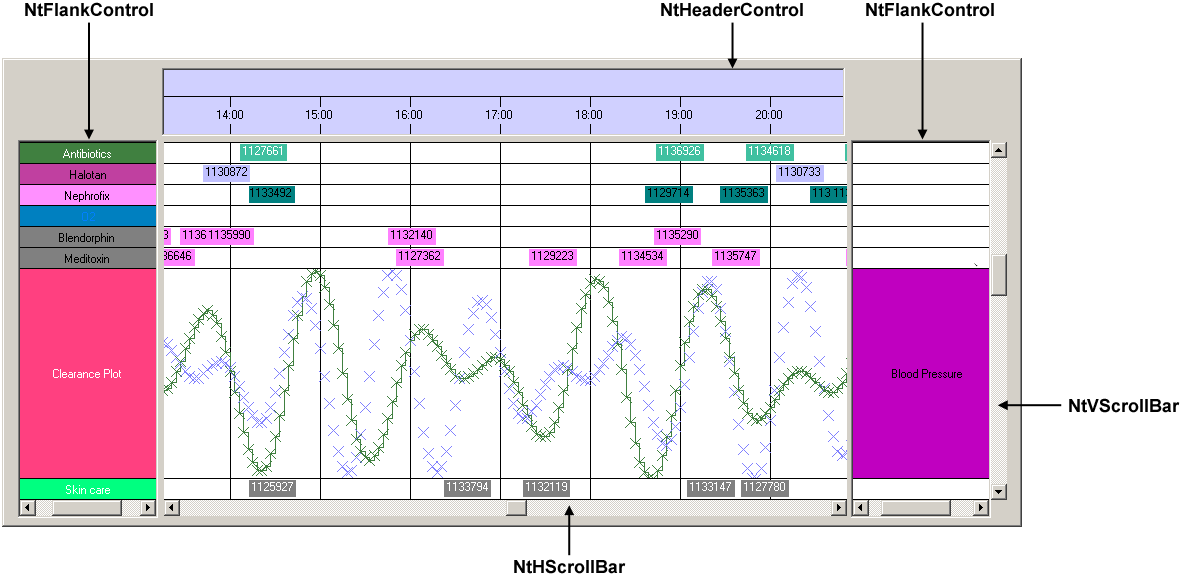
A NtTimeChartControl can (and will in most cases) be joined by a NtHeaderControl and one or more
NtFlankControls. In general these are directly attached to the NtTimeChartControl. The vertical
scroll bar in this case is then not attached to the NtTimeChartControl but typically locatet to the right of rightmost
NtFlankControl. And the horizontal scroll bar is either directly attached to the NtTimeChartControl
in cases of the header control being located on top, but below the header control if the latter one is located to the bottom of the NtTimeChartControl.
In the following image, please see the vertical scroll bar being attached to the rightmost NtFlankControl while the horizontal scroll bar is directly
attached to the NtTimeChartControl:
Overload List:
| Modifier / Return Value | Name and Parameters | Description |
|---|---|---|
|
|
|
Attaches a vertical and a horizontal scroll bar to this NtTimeChartControl. |
Return value:
None.
Parameters:
NtHScrollBar
The horizontal scroll bar control. You typically create this by picking it from the custom controls section of the
Visual Studio Designer Tool Box and put it to your Form.
NtVScrollVar
The vertical scroll bar control. You typically create this by picking it from the custom controls section of the
Visual Studio Designer Tool Box and put it to your Form.
Remarks:
When designing Windows Forms applications, it is common practice to design the layout within the IDE's designer. You do not only specify the position of the controls there, but also define anchors to define the controls' behaviours when the Form's size changes. You do the same with the scroll bars.
See also:
NtHScrollBarNtVScrollBar